Geozilla - Family GPS Locator
GZ TECHLifestyle
4.23.18K Reviews
- Version
- Varies With Device
- Installs
- 10.00M
- Age Rating
- Everyone
Screenshots


Our Review of Geozilla - Family GPS Locator
 Analysis by Appyee
When a family is spread across school, work, errands, and separate commutes, a quick location check can be more useful than a string of “Where are you?” messages. GeoZilla - Family GPS Locator is built around that simple idea: people in a family circle can share their phone locations so others can check where they are. I find that most helpful when it replaces repeated check-ins, not when it turns into a reason to watch someone constantly.
What location sharing changes day to day
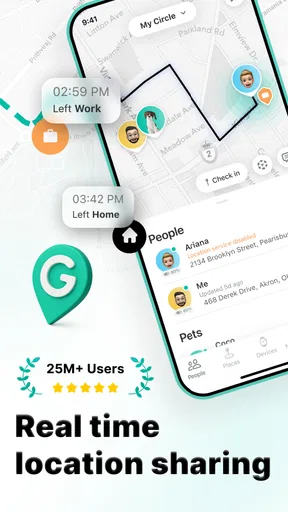
Location tracking is the central appeal here. Rather than asking each person to send an update whenever plans shift, relatives can look at the shared map and get a general sense of where everyone is. That can make coordination easier for parents, partners, or relatives who regularly travel together, especially when several people are arriving at different times.
The important distinction is that a location view is context, not a conversation. Seeing that someone is on the way may help you decide whether to start dinner or leave for pickup, but it cannot tell you why they stopped, whether they are safe, or when they will arrive with certainty. I would use the map to reduce routine uncertainty and still call or message when the situation actually needs an answer.
Setting up a circle and making it useful
First things first, downloading and setting up GeoZilla is a piece of cake. You can find it on both Android and iOS, which is super convenient if your family uses different devices. Once installed, the setup process is pretty straightforward. You'll need to create an account and invite your family members to join your circle. The app uses phone numbers or email invites, so it's really easy to get everyone onboard.
The interface is clean and user-friendly, which I appreciate. It's intuitive enough that you won't need to spend much time figuring out where everything is. There's a home screen that displays your family members and their current locations, which updates in real-time. Pretty neat, right?
For a smoother start, I’d agree on the purpose of the circle before sending invitations. Is it mainly for coordinating pickups, checking that someone got home, or keeping relatives informed during a shared outing? A clear reason makes location sharing feel mutual rather than imposed. It also gives everyone a chance to decide whether they are comfortable joining and to ask how they can pause sharing when they want privacy.
Location history and arrival alerts in a routine
Now, let's dive into some of the features that make GeoZilla a standout in the world of family locators. First up is the real-time tracking. You can see where your loved ones are at any given moment, which is especially handy if you have teenagers who love to roam.
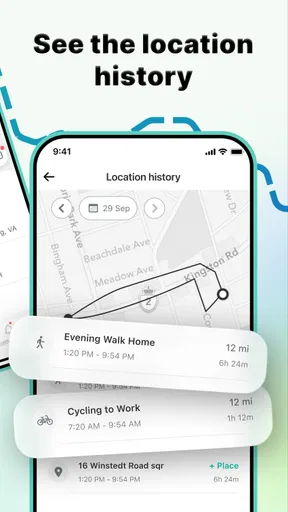
Another feature I found helpful is the location history. This allows you to see where your family members have been over the past few days. It's a great way to keep track of daily routines, or even retrace your steps if you’ve forgotten where you've been (guilty as charged!).
GeoZilla also offers a handy alert system. You can set up notifications for when someone arrives or leaves a particular location. So, if you want to know when your kids get to school or when your partner leaves work, you can set that up easily. It’s a great way to stay in the loop without being intrusive.
A practical way to use those alerts is to reserve them for places that genuinely affect the day’s plan, rather than turning every stop into a notification. For example, a parent might want to know when a child reaches school, while a couple could use an arrival or departure alert to coordinate who is picking up groceries. Keeping the chosen locations limited helps the alerts stay meaningful instead of becoming background noise.
History can also be useful for resolving small logistical puzzles, such as working out whether someone already went past a pickup point. I would treat it as a memory aid, not as a definitive record of a person’s intentions or schedule. If a route looks unexpected, asking the person is more respectful and more reliable than drawing conclusions from a map.
Using family tracking with care
I’d use this section to draw a clear line between practical coordination and constant monitoring. Before anyone joins a family circle, I’d agree on when location checks are useful and make sure each person knows they can pause sharing; that shared understanding is what makes the tools in the next section feel supportive rather than intrusive.
Emergency use and sensible expectations
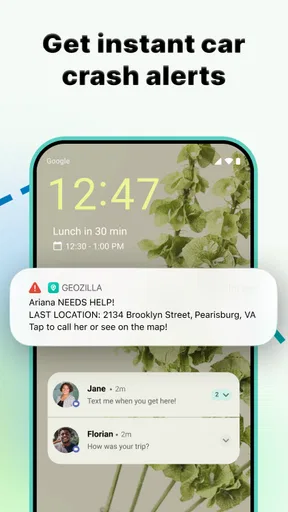
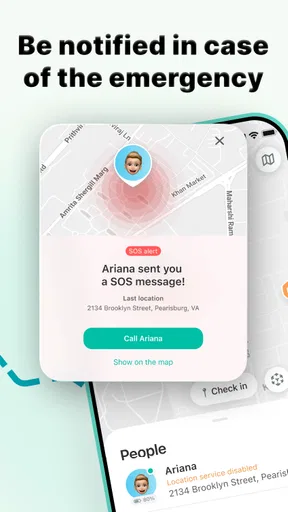
One of the main reasons I decided to try GeoZilla was for the safety features. The app includes an SOS button that allows family members to send their exact location in case of an emergency. This feature alone provides a lot of peace of mind, especially when you can't be with your loved ones 24/7.
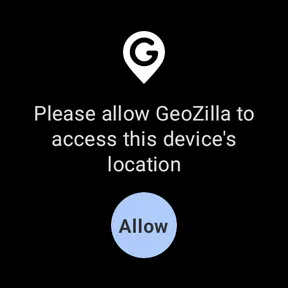
Additionally, the app integrates with wearable devices, which is a win if you or your family members prefer using smartwatches. This adds an extra layer of convenience, especially for those who are always on the go.
I would still treat an SOS option as one part of a safety plan, not as a substitute for emergency services or a direct call. Before relying on it, family members should know where the control is and understand what they should do after sending an alert. That small conversation is easy to overlook, but it matters more than simply installing an app.
A realistic example is a family arranging a late pickup after an after-school activity. The parent waiting at home can check whether the family member appears to be travelling, while the person on the way can use a message or call if plans change. If the person feels unsafe, the emergency option may help communicate their location. The benefit is shared awareness; the app cannot remove the need for judgment or clear communication.
Privacy should be part of the setup
In today's world, privacy is a big concern, and GeoZilla takes this seriously. The app ensures all location data is encrypted, and you have full control over who sees your location. You can choose who to share your location with and when, which is reassuring.
There’s also a feature to pause location sharing if you want some time off the grid. It’s a nice touch if you're heading somewhere personal or just want some privacy for a while.
In my view, the pause control is most useful when it is treated as an ordinary boundary rather than something that needs an explanation. Families can agree that sharing is for practical coordination and that each person may take private time. That makes the feature easier to use honestly and reduces the temptation to interpret a pause as a problem.
Because location services depend on the phones and the people using them, I would not assume a map position is always a perfect account of what is happening. A device may not be with its owner, and a location shown on a screen is not a substitute for checking in when circumstances are unusual. The best routine is to use tracking as a convenience, then switch to a direct conversation if the information seems incomplete.
How it compares with simpler options
Compared with texting, a shared location can save time when several relatives need the same basic update; nobody has to send “I’m here” messages to each person. A phone call remains better for a nuanced question, and a family group chat is usually better for changing plans or sharing details. GeoZilla’s strength is seeing location context in one place, while the usual messaging tools are stronger for explaining what that context means.
It is also different from relying on a built-in map-sharing option already available on a phone. If your household only needs occasional one-to-one sharing, the tool you already use may be enough and may feel simpler. A dedicated family locator makes more sense when several family members want a shared routine around location checks, alerts, and emergency contact. I would choose based on how often the whole group coordinates, not on how many tracking functions an app appears to offer.
GeoZilla is a lifestyle app from GZ TECH, and its broad appeal is reflected in an average rating of 4.2 from around 601,000 ratings, with more than 10 million installs. It is free to download and rated for Everyone; optional in-app purchases range from $2.99 to $89.99 per item. I’d consider the paid options only after deciding that the basic family-location routine fits your household, rather than paying before you know whether everyone will use it.
Who will benefit, and who may prefer another choice
I think this app is most useful for families whose members travel independently but have recurring coordination needs: school journeys, work commutes, shared outings, or checking that someone reached a planned destination. It can also help relatives who want a simple way to stay informed without calling every time a trip takes longer than expected. The key is that the people being tracked should understand the arrangement and want to participate.
It is a weaker fit for someone who wants occasional contact only, dislikes sharing location, or expects a map to provide a complete safety guarantee. It may also feel unnecessary if a household already coordinates comfortably through calls, texts, or a phone’s existing sharing tools. In those cases, adding another app and another shared routine could create more friction than value.
All in all, GeoZilla - Family GPS Locator lives up to its promise of providing an easy and efficient way to keep track of your family. Its blend of real-time tracking, safety features, and privacy controls make it a must-have for anyone looking to stay connected with their loved ones.
Sure, no app is perfect, and it might not replace a good old-fashioned phone call or text, but it’s a handy tool to have in your tech arsenal. So, if you're looking to add a little peace of mind to your daily routine, give GeoZilla a try. You might just find it’s the app you didn’t know you needed.
Verdict
Strengths of Geozilla - Family GPS Locator
- Accurate real-time location tracking.
- Easy-to-use interface for all ages.
- Battery-saving mode extends phone life.
- SOS feature enhances family safety.
- Supports location history and alerts.
Limitations of Geozilla - Family GPS Locator
- Requires continuous internet connection.
- Subscription needed for premium features.
- Limited features in free version.
- May drain battery on older devices.
- Location accuracy can vary in rural areas.
Similar Picks in This Category
View All
SmartThings
Samsung Electronics Co., Ltd.4.6

Google Home
Google LLC4.0

Pinterest4.2

Astrotalk - Talk to Astrologer
Astrology & Horoscope4.7

My Verizon
Verizon Consumer Group4.5

Samsung Wallet (Samsung Pay)
Samsung Electronics Co., Ltd.4.1
Frequently Asked Questions
What is GeoZilla and how does it work?
GeoZilla is a family GPS locator app that helps you keep track of your loved ones. It uses real-time GPS tracking to provide the locations of family members on a private map. The app requires an internet connection and GPS enabled on the devices being tracked. Users can set up alerts for specific locations and receive notifications when family members arrive or leave those places.
Is GeoZilla safe and secure to use?
Yes, GeoZilla prioritizes user privacy and security. The app uses encrypted connections to ensure that location data is protected. Each family group is private, and only invited members can access the shared location information. The app complies with GDPR regulations, providing users control over their data and the ability to delete their accounts and data anytime.
What features does GeoZilla offer?
GeoZilla offers several features, including real-time location tracking, location history, and geofencing alerts. Users can set up emergency notifications and share their battery status. The app also supports location-based reminders and the ability to check in at various places. Family members can communicate through the app’s built-in messaging feature, enhancing coordination and safety.
Does GeoZilla affect battery life significantly?
GeoZilla is designed to be battery-efficient by using a combination of GPS, Wi-Fi, and cell tower triangulation to determine location. However, like any GPS-based app, it can impact battery life, especially if tracking is continuous. Users can optimize battery usage by adjusting update intervals and enabling battery saver mode within the app settings.
Is GeoZilla available on both Android and iOS platforms?
Yes, GeoZilla is available for download on both Android and iOS devices. You can find it on the Google Play Store and the Apple App Store. The app requires a compatible device with GPS capability and an internet connection. Both free and premium versions are offered, with the premium version providing additional features like unlimited location history.
